Loading the model
This device cannot show the 3D model. You can read the guide steps below as text.
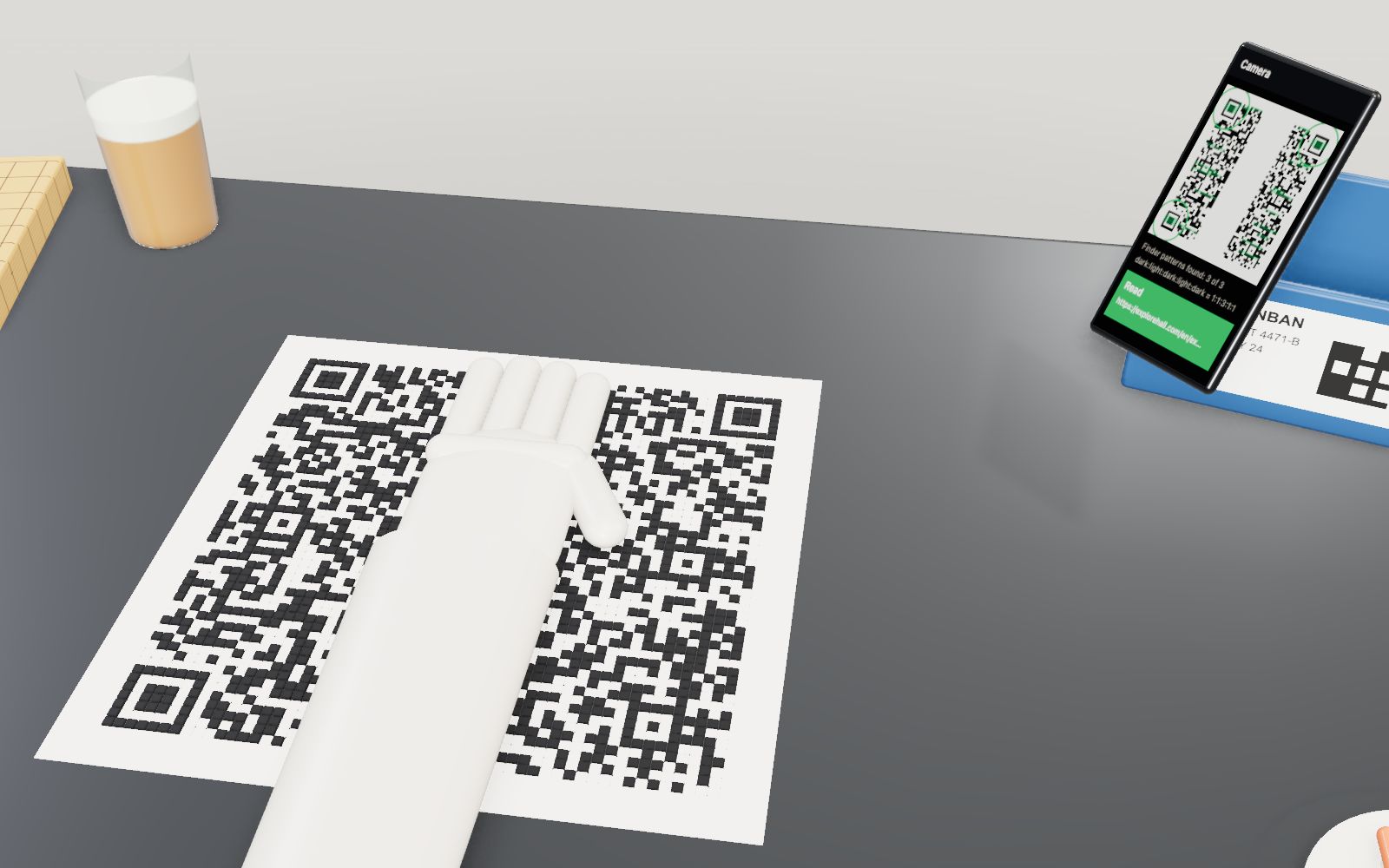
1 / 20 30 % under a hand This is your text as a QR code at level H, version 9: 53 x 53 modules. A mannequin hand slides over it. Watch the readout and the phone on the right: the code keeps reading while the hand covers about 30 % of the modules.
Drag to turn. Scroll or pinch to zoom.
Guide Parts Controls
01 30 % under a hand This is your text as a QR code at level H, version 9: 53 x 53 modules. A mannequin hand slides over it. Watch the readout and the phone on the right: the code keeps reading while the hand covers about 30 % of the modules.
02 Finder patterns The three big squares are the first thing a camera looks for. A line through the middle of each one crosses dark, light, dark, light, dark in widths 1:1:3:1:1, at any angle. DENSO WAVE picked that ratio because it is rare in print.
03 Separators and the margin Each finder sits in a light ring one module wide, and the whole symbol needs a light margin four modules wide. Without them the finder’s stripes run into whatever is next to it.
04 Timing patterns Row 6 and column 6 alternate dark and light from one finder to the next. They work like a ruler, so the reader knows where each column and row is even when the print is stretched.
05 Alignment patterns From version 2 there are small targets of 5 x 5 modules. The reader uses them to follow a code printed on a curved or tilted surface. Version 9 has six; version 40 has 46.
06 Format information Next to the finders sit 15 bits that say which level and mask were used. They are a BCH code that survives three wrong bits, and they are written twice so one copy can be damaged.
07 Version information From version 7 the version number is written out in two 6 x 3 blocks, 18 bits each, again with a BCH code. Smaller symbols do not need it.
08 The dark module Beside the bottom-left finder there is one module that is always dark. Click it to open its card.
09 How the data is placed Your text becomes a stream of bits: a mode indicator, a character count, the characters, a terminator and pad bytes. The red line shows the order: two columns at a time, up and down, starting at the bottom-right corner and skipping every function pattern.
10 Blocks of error correction The codewords are split into blocks and each block gets its own Reed-Solomon codewords. The colours show the blocks. They are interleaved, so a smudge in one place hits several blocks a little instead of one block a lot.
11 Every module has a job Lifted into layers, the modules sort themselves by job: finders on top, then separators, timing, alignment, format, version, and the data and error correction codewords at the bottom.
12 Masks Before printing, a mask flips the data modules where a rule is true (orange). Eight rules are tried and the one with the fewest penalty points wins: no big blocks, long runs or patterns that look like a finder.
13 Four levels At level L the same text needs fewer modules, but only about 7 % of the codewords can be fixed. M is about 15 %, Q 25 % and H 30 %. More protection means a bigger symbol.
14 A small tear in the wrong place A torn corner removes less than 10 % of the modules, yet the code no longer reads: the top-left finder is gone, and without three finders the reader never starts.
15 Upside down QR codes read in any direction. Turn the symbol; the phone still finds the three finders and works out which one is the top-left corner from the right angle between them.
16 Take away the margin Switch off the quiet zone on this dark table and the phone stops finding the finders: the outer dark ring merges with the table, and the 1:1:3:1:1 stripes are gone.
17 Versions 1 to 40 On the wall: versions 1, 5, 10, 20, 30 and 40 at the module size of the table. Each version adds 4 modules per side, from 21 x 21 to 177 x 177.
18 A bar code for comparison An EAN-13 bar code holds 13 digits and has only a check digit. Cover its top half and it still reads, because any one clear line across it is enough.
19 Micro QR Micro QR has one finder pattern and a margin of two modules. M1 is 11 x 11 modules and holds 5 digits; M4 holds up to 35.
20 For scale The mannequin is 1.7 m tall. The symbol on the table is 30 cm wide; at the 0.33 mm of a label printer version 9 would be 17.5 mm wide without its margin.
Finder pattern Three squares in the corners with stripes in the ratio 1:1:3:1:1. The camera looks for them first. Separator A light ring one module wide that keeps each finder clear of the data. Timing pattern Alternating modules along row 6 and column 6 that let the reader count rows and columns. Alignment pattern 5 x 5 targets from version 2 on. Version 9 has six of them. Format information 15 bits with the level and the mask, written twice, protected by a BCH code. Version information 18 bits from version 7 on, written twice. Dark module A module beside the bottom-left finder that is dark in every symbol. Data codewords Your text: mode indicator, character count, characters, terminator and pad bytes. Error correction codewords Reed-Solomon codewords for each block. They fix wrong codewords. Remainder bits Modules left over after the last codeword in some versions. Quiet zone The light margin, four modules wide. Mannequin hand The cover. It reads as light, like a sheet of paper over the code. Phone camera Runs the finder search on its own pixels and shows the result. Person for scale A faceless mannequin, 1.7 m tall. Set your height in the lab. EAN-13 bar code A retail bar code: 13 digits and no error correction. Micro QR The smallest member of the family, with a single finder pattern.