Loading the model
This device cannot show the 3D model. You can read the guide steps below as text.
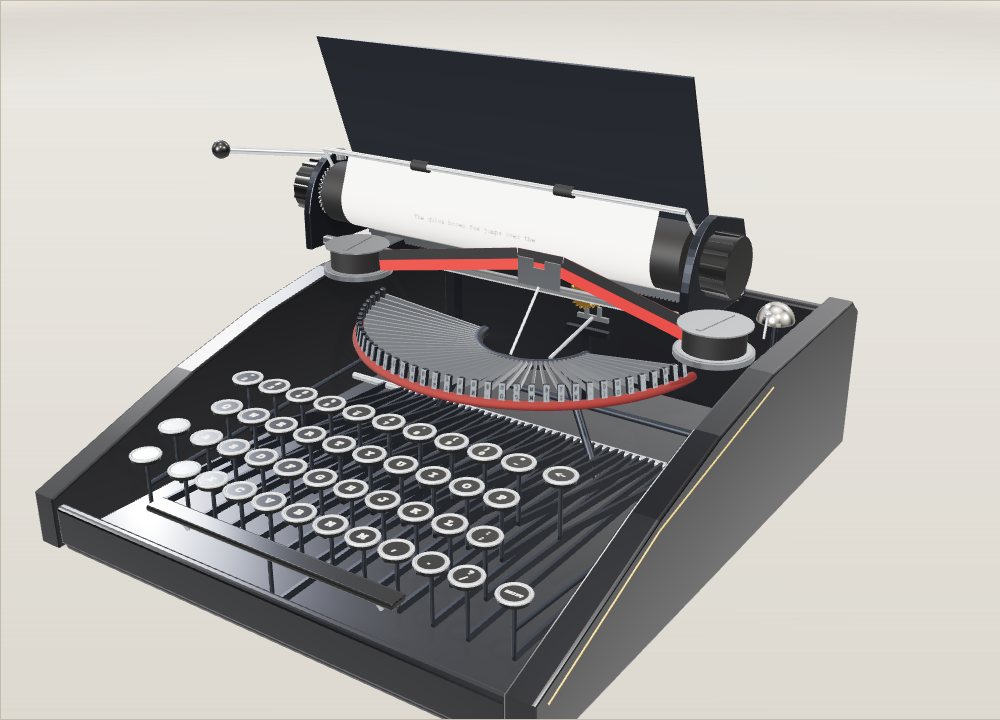
1 / 8 A machine with no electricity Everything on this typewriter runs on the push of a finger and one spring. The model is typing two pangrams on a 40-character line. Click it and type on your own keyboard, or use the keys on screen.
Drag to turn. Scroll or pinch to zoom.
Guide Parts Controls
01 A machine with no electricity Everything on this typewriter runs on the push of a finger and one spring. The model is typing two pangrams on a 40-character line. Click it and type on your own keyboard, or use the keys on screen.
02 Key and key lever A key is the front end of a long lever. Pressing it about 6 mm swings the lever on a shaft at the back, and a link pulls the bottom of one typebar. Here the a key goes down three times in slow motion.
03 The typebar jumps out of the basket The 40 typebars lie in a half circle with their tips on a felt pad. The pulled bar swings about 110 degrees and its slug flies to one point in front of the platen. Every bar meets the paper at that same spot.
04 Ribbon and ink The slug never touches the paper directly. A guide lifts the inked ribbon into the gap a moment before the strike, the slug hits the cloth, and the ink is pressed into the fibres. Then the ribbon drops so you can read the letter.
05 One letter, one tooth Behind the machine a pinion meshes with a rack under the carriage. A star wheel on the same shaft is held by a rocking dog. Each stroke rocks the dog, the spring pulls the carriage, and the wheel slips by exactly one of its 20 teeth, which is 2.54 mm.
06 The bell near the margin The carriage starts at column 28 and keeps typing. When it reaches column 34 the hammer hits the bell, a warning that six spaces are left. At column 40 the margin stop locks the keys until you return.
07 Return and line space Pushing the return lever does two jobs. The first part of the push turns the platen by one line, 4.23 mm at single spacing, and the rest of the push slides the carriage back to the left margin. Try the spacing slider and return again.
08 Two letters on every typebar Each slug carries a small letter and its capital 4.4 mm above it. Shift raises the whole carriage so the upper character meets the ribbon. Switch on Basket shift to see the other design, where the typebars drop instead.
Keys 40 character keys in four rows, each with two characters. There is no 1 key: typists used a small l. Key levers Long levers under the keys. Pressing a key swings its lever on the shaft at the back and pulls one typebar. Typebars 40 steel arms fanned out in a half circle, the basket. Each carries a slug with a capital above and a small letter below, cut in mirror image. Ribbon and spools An inked cloth strip, black over red, runs between two spools. A small guide lifts it in front of the slug for each strike. Platen The hard rubber roller, 38 mm across in the model. The typebar presses the ribbon against the paper here, and turning it feeds the sheet. Paper A US letter sheet, 216 × 279 mm. The model fits 40 characters on a line and 52 single-spaced lines on the page. Carriage The frame that holds the platen and slides along two rails. It moves one character to the left after every letter. Escapement A star wheel with 20 teeth and a rocking dog. Each key stroke lets the wheel turn one tooth, which lets the carriage move 2.54 mm. Mainspring drum A coiled spring in a drum pulls the carriage to the left on a strap. Returning the carriage winds it up again. Bell A hammer on the carriage path strikes the bell six spaces before the right margin in the model. Return lever Pushing it first turns the platen one line, then the same push slides the carriage back to the left margin. Shift and lock Shift lifts the carriage by 4.4 mm so the capital on the slug prints. Lock holds it up.